
 Design
 Coding
 Setting
WordPressのダウンロード
05:58固定ページの作り方
今回は、カスタムテンプレートを使って特定のデザインや機能を持った固定ページを作成する方法について解説します。この方法を使えば、今まで学習してきたHTMLとCSSでコーディングができるので、普段通りの感覚でサイト制作ができます。
固定ページの作成手順
固定ページの作成手順は以下の通りです。
これから紹介する手順に従って進めていきましょう。
完成イメージ:完成図を見る
1. 固定ページの作成
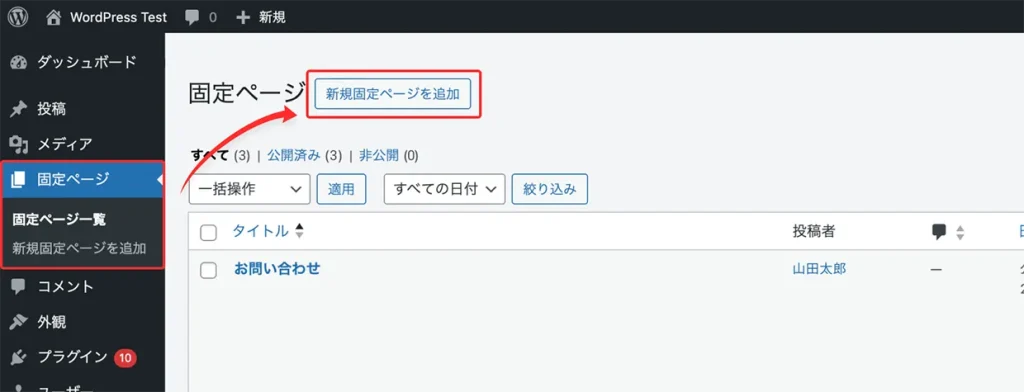
WordPressの管理画面にログインし、「固定ページ」→「新規固定ページを追加」ボタンをクリックして新しい固定ページを作成します。
2. 固定ページの編集と設定
ここでは、作成した固定ページに必要な情報を入力し、公開できる状態に整えていきます。
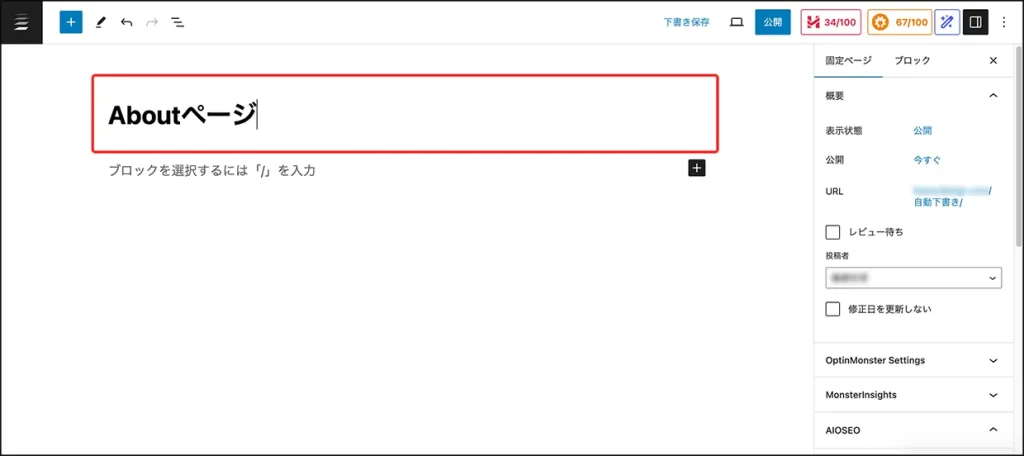
今回は、「Aboutページ」を例に、実際に編集設定を進めてみましょう。
タイトルを入力
タイトル入力欄に、固定ページのタイトルを入力します。
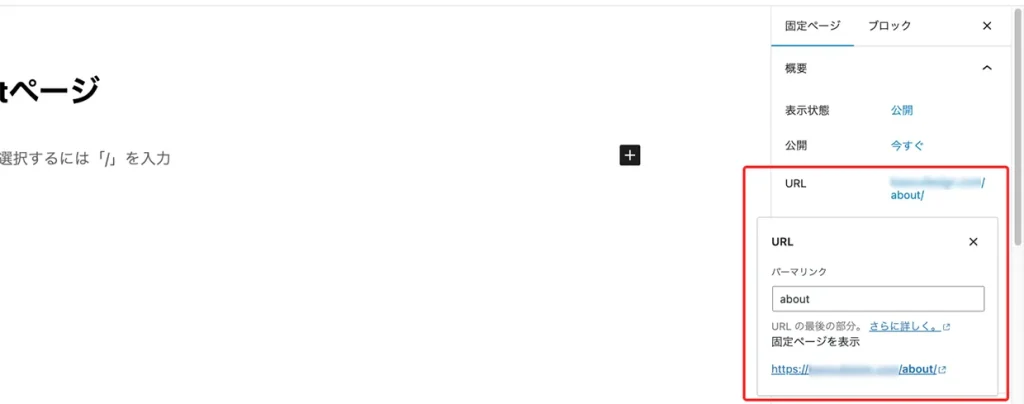
URLスラッグを設定
固定ページのURLスラッグを設定します。日本語タイトルの場合は、自動で日本語になるため英数字に変更しましょう。
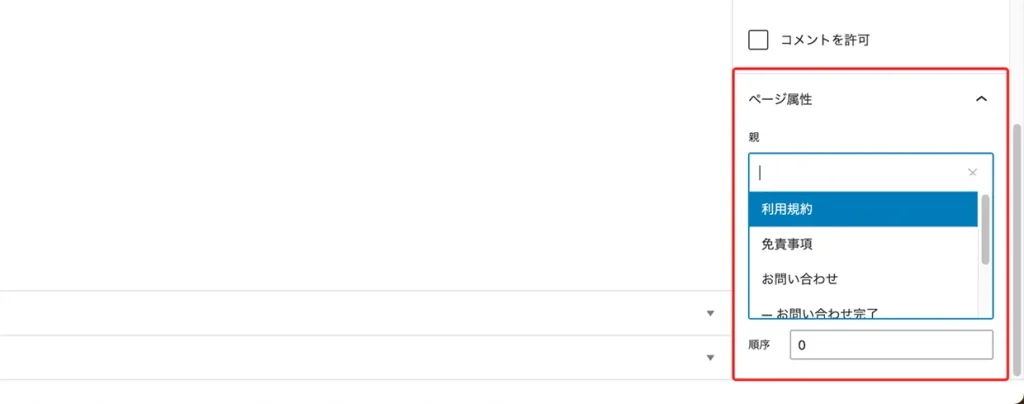
ページ属性を選択 (※必要に応じて)
お問い合わせページなど親子関係を持たせたい場合は、必要に応じてここで親ページを設定します。
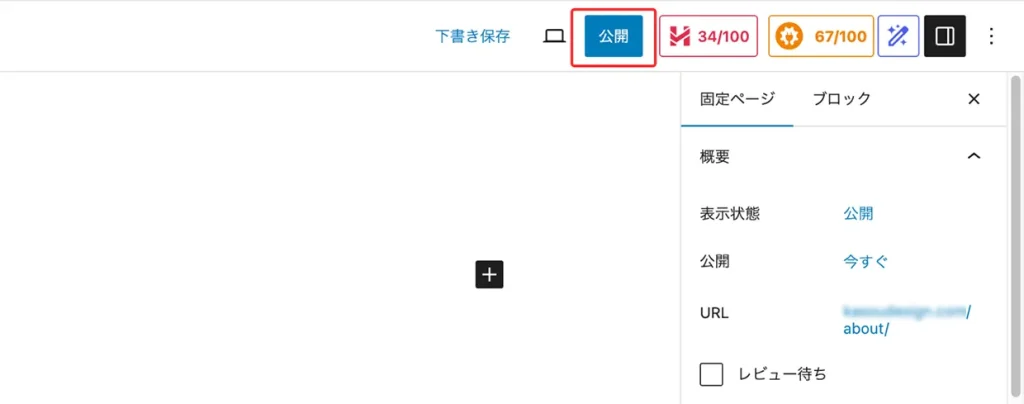
公開設定を確認し、公開
❶ 〜 ❸ の設定が完了したら、「公開」ボタンをクリックします。公開後、設定したURL(例:https://ドメイン/about/)にアクセスして、正しく表示されているか確認しましょう。
3. カスタムテンプレートの作成
ここでは、カスタムテンプレートを作成し、ページのコンテンツのコーディングを行います。
カスタムテンプレートファイルの作成
まず、SSH接続したVisual Studio Codeを使用して、wp-content/themes/使用テーマ に移動し、新しいPHPファイルを作成します。
今回作成するファイルは、先ほど管理画面で作成した aboutページ用のテンプレートで、ファイル名は page-about.php とします。
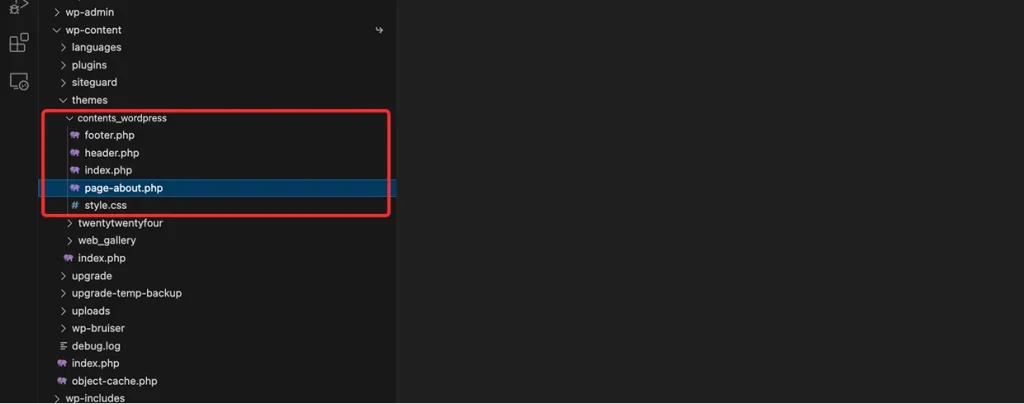
テンプレートのベースコーディング
以下のコードをファイルに追加します。
これで、Aboutページに必要な基本的なテンプレートが作成されます。
<?php get_header(); ?>

<div class=”l-main”>
    <h1><?php the_title(); ?></h1>
    <div><?php the_content(); ?></div>
</div>

<?php get_footer(); ?>
別途、header.phpなどのAboutページに遷移するリンクを記述しておきましょう。
the_title() とは
the_title() は、WordPressのテンプレートタグの一つで、投稿や固定ページのタイトルを表示するために使用されます。
the_content() とは
the_content() は、WordPressのテンプレートタグの一つで、投稿や固定ページの本文コンテンツを表示するために使用されます。
コンテンツのコーディング
先ほど追加した <?php the_title(); ?> と <?php the_content(); ?> は、このカスタムテンプレートでは使用しないため削除します。代わりに、今回はテンプレート内に、コンテンツを直接コーディングしていきます。
以下のコードを page-about.php に記述しましょう。
コンテンツのHTMLコード
<div class="l-main p-page">
  <!-- About -->
  <section class="p-section p-about bg-img c-txt--center">
    <div class="l-container--800">
      <div class="p-section__head">
        <h3 class="p-title">
          <span class="p-title--en">About</span>
          住まいづくりは、<br class="off_tablet">あなたを知ることから。
        </h3>
      </div>
      <div class="p-section__body">
        <p class="p-sectionAbout__description">暮らしに“らしさ”があるように、<br class="off_spWide">住まいにも個性があっていい。</p>
        <p class="p-sectionAbout__description">私たちはまず、<br class="off_sp">あなたの価値観や日常に耳を傾け、<br>「どう暮らしたいか」を一緒に考え、<br class="off_spWide">世界にひとつだけの住まいを、<br>ともにカタチにしていきます。</p>
        <div class="p-about__results">
          <div class="p-about__results--box">
            <p class="title">累計施工数</p>
            <p class="data">250<span class="c-unit">件以上</span></p>
          </div>
          <div class="p-about__results--box">
            <p class="title">施工エリア</p>
            <p class="data">15<span class="c-unit">市町村以上</span></p>
          </div>
          <div class="p-about__results--box">
            <p class="title">お客様満足度</p>
            <p class="data">85<span class="c-unit">%以上</span></p>
          </div>
        </div>
      </div>
    </div>
  </section>
  <!-- Features -->
  <section class="p-section p-features c-txt--center">
    <div class="l-container--800">
      <div class="p-section__head">
        <h3 class="p-title">
          <span class="p-title--en">Features</span>
          <span>あなたの理想を叶えるための<br class="off_tablet">“<span class="lg">5</span>つ”のこだわり</span>
        </h3>
      </div>
      <div class="p-section__body">
        <p>それぞれの暮らしに寄り添い、<br class="off_spWide">“らしさ”をカタチにするために。<br>私たちは、5つの視点で<br class="off_spWide">理想の住まいづくりをサポートします。</p>
        <ol class="p-featuresList">
          <li>
            <div class="p-featuresList__item--img">
              <img src="<?php echo get_template_directory_uri(); ?>/public/img/icon/icon_feature_1.svg" alt="特徴1" width="56" height="56">
            </div>
            <div class="p-featuresList__item--text">
              <p class="title">あなたの理想を形にした、<br class="off_spWide">自由設計</p>
              <p class="description">見た目の美しさと使いやすさを両立させ、ライフスタイルにぴったりな住まいを実現します。</p>
            </div>
          </li>
          <li>
            <div class="p-featuresList__item--img">
              <img src="<?php echo get_template_directory_uri(); ?>/public/img/icon/icon_feature_2.svg" alt="特徴2" width="56" height="56">
            </div>
            <div class="p-featuresList__item--text">
              <p class="title">性能にも妥協しない安心構造</p>
              <p class="description">断熱・耐震・省エネなど、最新の基準を満たす高性能な住まいで、長く快適に暮らせます。</p>
            </div>
          </li>
          <li>
            <div class="p-featuresList__item--img">
              <img src="<?php echo get_template_directory_uri(); ?>/public/img/icon/icon_feature_3.svg" alt="特徴3" width="56" height="56">
            </div>
            <div class="p-featuresList__item--text">
              <p class="title">コストバランスを考えた提案</p>
              <p class="description">理想を叶えつつ、無理のない資金計画で、デザイン・性能・コストのバランスに優れたご提案をします。</p>
            </div>
          </li>
          <li>
            <div class="p-featuresList__item--img">
              <img src="<?php echo get_template_directory_uri(); ?>/public/img/icon/icon_feature_4.svg" alt="特徴4" width="56" height="56">
            </div>
            <div class="p-featuresList__item--text">
              <p class="title">専門家によるワンチーム体制</p>
              <p class="description">建築士・インテリアコーディネーター・現場監督など、経験豊富なスタッフが一丸となってサポートします。</p>
            </div>
          </li>
          <li>
            <div class="p-featuresList__item--img">
              <img src="<?php echo get_template_directory_uri(); ?>/public/img/icon/icon_feature_5.svg" alt="特徴5" width="56" height="56">
            </div>
            <div class="p-featuresList__item--text">
              <p class="title">住んでからも続くお付き合い</p>
              <p class="description">引き渡し後も、定期点検やご相談対応などを通じて、長く安心して暮らせるサポート体制を整えています。</p>
            </div>
          </li>
        </ol>
      </div>
    </div>
  </section>
  <div class="p-bread">
    <div class="l-container--1080">
      <ul class="p-bread__list">
        <li><a href="<?php echo home_url(); ?>">Home</a></li>
        <li><span>About</span></li>
      </ul>
    </div>
  </div>
  <!-- Contact -->
  <?php get_template_part('component/_contact'); ?>
</div>
お問い合わせセクションは共通部分のため、コンポーネント化して表示できるようにしています。
以下のコードを sytle.css に記述しましょう。
コンテンツのCSSコード
/* ! ==================================================
- コンテナ
================================================== */
.l-container--800 {
  max-width: calc(800px + 32px);
}

/* ! ==================================================
- ヘッダー
================================================== */
.l-body:has(.p-page) .l-header{
  background-color: var(--base);
}

/* ! ==================================================
- オブジェクト
================================================== */
/* ! --------------------------------------------------
- オブジェクト / ページ
-------------------------------------------------- */
.p-page {
  margin-top: 88px;
}

/* ! --------------------------------------------------
- オブジェクト / About
-------------------------------------------------- */
.p-about {
  background-image: url(public/img/bg_about.webp);
}

/* 実績数字 */
.p-about .p-about__results--box {
  border-color: var(--white);
  background-color: rgba(255,255,255,.1);
}

/* 特徴 */
.p-featuresList {
  margin-top: 32px;
  counter-reset: item;
}
.p-featuresList > li + li {
  margin-top: 8px;
}
.p-featuresList > li {
  display: flex;
  align-items: center;
  flex-direction: column;
  gap: 24px;
  padding: 24px 32px;
  border: 1px solid var(--base);
  position: relative;
}
.p-featuresList > li::after {
  counter-increment: item;
  content: counter(item, decimal-leading-zero) " ";
  font-style: italic;
  font-size: 80px;
  font-weight: 500;
  line-height: 1em;
  letter-spacing: .02em;
  opacity: .04;
  position: absolute;
  right: 4px;
  bottom: 4px;
}
.p-featuresList .title {
  font-size: 16px;
  font-weight: 500;
  line-height: 1.5em;
  margin-bottom: 4px;
}
.p-featuresList .description {
  font-size: 14px;
}
.p-featuresList__item--img {
  flex: 0 0 56px;
}
.p-featuresList__item--img img{
  object-fit: contain;
}
@media screen and (min-width: 575px) {
  .p-featuresList {
    text-align: left;
  }
  .p-featuresList > li {
    flex-direction: row;
  }
  .p-featuresList .title {
    font-size: 18px;
  }
  .p-featuresList .description {
    font-size: 16px;
  }
}

/* ! --------------------------------------------------
- オブジェクト / パンくず
-------------------------------------------------- */
.p-bread__list {
  display: flex;
  align-items: center;
  gap: 10px;
  margin-bottom: 8px;
}
.p-bread__list > li {
  display: flex;
  align-items: center;
  gap: 10px;
}
.p-bread__list > li a,
.p-bread__list > li span {
  color: var(--gray);
  font-size: 12px;
  font-weight: 500;
  line-height: 1em;
  letter-spacing: .02em;
}
.p-bread__list > li a {
  color: var(--light);
}
.p-bread__list > li a:hover {
  text-decoration: underline;
}
.p-bread__list > li:has(a)::after {
  content: "";
  display: block;
  width: 24px;
  height: 24px;
  background-image: url(public/img/icon/icon_arrow_right.svg);
  background-repeat: no-repeat;
  background-size: contain;
  background-position: center;
}
今回追加されたスタイルのみ記述しています。
表示の確認
ブラウザで表示を確認し、表示崩れなどないか確認しましょう。
サイトが正しく表示されていれば完了です。
固定ページ作成のポイント
- 固定ページを作成したら、各種設定を忘れずに行う
タイトルやURLスラッグ、公開状態などの情報は必ず設定します。 - カスタムテンプレートのファイル名は page-スラッグ名.php にする
カスタムテンプレートを作るときは、page-スラッグ名.php という形式にします。 - テンプレートタグ( get_title() や get_content() など )は必ず使用する
管理画面で編集したタイトルや本文を反映させるには、これらのテンプレートタグを使う必要があります。(※ the_content() は管理画面で本文を編集している場合のみ使用。)。
以上が「固定ページの作り方」の説明でした。
ぜひ実際に、他の固定ページも作ってみて、少しずつスキルを身につけていきましょう。
また、「固定ページの作成」のステップも全て終了となります。
引き続き、別のステップも進めていきましょう。
WordPress
全 13 動画